1 Getting started
This chapter tells you how to install the necessary software on your computer.
1.1 Installing R
To begin, you will need to install R. This is the engine that runs the code. You need to install the newest version (v4) as well as an older version (v3.6.2).
The older version will be used when running the code from the modules of SOA, which needs to be consistent with what will be installed on the Prometric computers. This course uses the newest version so that you will not have as many errors during practice.
Download it from here: https://cran.r-project.org/mirrors.html
You can easily switch between both of them after installation.
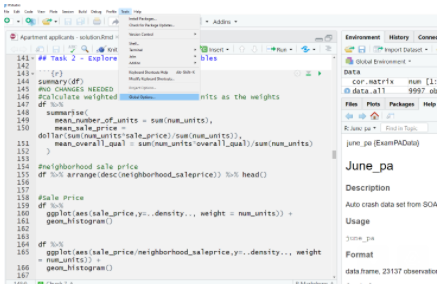
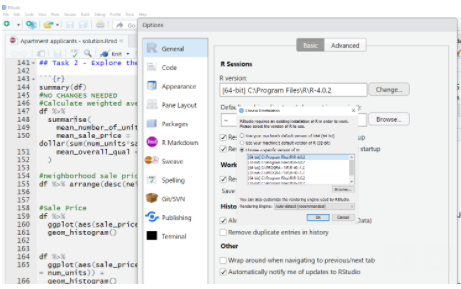
Remember:
For this course, use a version later than 4.0.2.
For the module of SOA, use version 3.6.2.
1.2 Installing RStudio
Just as MS Word creates documents, RStudio creates R scripts and other documents. This is the tool that helps you to write the code. Download the free edition of RStudio Desktop and instal it at your selected location.
Download it from here: https://rstudio.com/products/rstudio/download/
Next you need to set the R library. R code is organized into libraries. You want to use the same code that will be on the Prometric Computers. It would require installing older versions of libraries. Change your R library to the one which was included within the Modules of SOA.
.libPaths("PATH_TO_SOAS_LIBRARY/PAlibrary")1.3 Download the data
For your convenience, all data in this book, including data from prior exams and sample solutions, has been put into a library called ExamPAData which is available on CRAN.
install.packages("ExamPAData")
library(ExamPAData)
To get the data dictionary for a data set, use ?dataset_name such as ?customer_phone_calls. For your convenience, you can use these data sets for your practice. They make great candidates for machine learning problems.
| Dataset | Description |
|---|---|
customer_phone_calls |
Data used on June 18, 2020 Exam PA |
patient_length_of_stay |
Data used on June 16, 2020 Exam PA |
patient_num_labs |
Data used on June 19, 2020 Exam PA |
actuary_salaries |
DW Simpson actuarial salary data |
june_pa |
Auto crash data set from SOA June 2019 PA |
customer_value |
Customer value data set from December 2019 PA |
exam_pa_titanic |
Titanic passengers as used in ExamPA.net’s practice exam |
apartment_apps |
Apartment applications as used in ExamPA.net’s Practice Exam |
health_insurance |
Health insurance claims as used in ExamPA.net’s Practice Exam |
student_success |
SOA Student Success PA Sample Project, 2019 |
readmission |
SOA Hospital Readmissions Sample Exam, 2019 |
auto_claim |
Automotive claims |
boston |
Boston housing data set |
bank_loans |
Credit data from UCI Machine Learning Repository |
1.4 Download ISLR
This book references the publically-available textbook “An Introduction to Statistical Learning,” which can be downloaded for free
http://faculty.marshall.usc.edu/gareth-james/ISL/
If you already have R and RStudio installed then skip to “Download the data.”